
23: The A'Mazing Clawbot
 Learning Target
- Code a robot to traverse a real world maze
- Use scalar multipliers to match code to reality
- Interact with objects in a maze
 Resources
Code V5 Website:
https://codev5.vex.com
Downloading Code to a Robot:
https://www.youtube.com/watch?v=uHnZ1Qj5QqM
 Instructions
This is a group activity, but each person will be graded based on their participation in the one or more of these roles:
- strategist - determine what the robot should do
- programmer - write code to meet the strategist's requirements
- robot tester - test the robot code on the maze
- facilitator - ensure everyone has a role and document progress
For this assignment, do NOT drive with the joystick. You will need to control the robot using code.
Step 1:
-
- Open your prior Clawbot project
- Rename it to Clawbot Maze - Team X.
- Ensure the name has been changed before continuing
- Delete the test code from the prior assignment
- Save the project
Step 2:
Your robot likely won't move exactly the distance to tell it to in your code. To fix this:
-
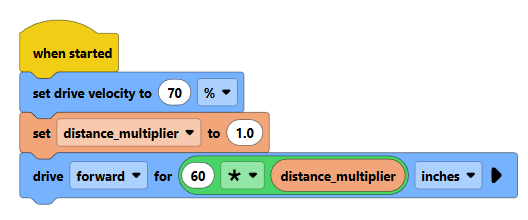
- Create a new variable called "distance_multiplier"
- Drive forward a few floor tiles (each floor tile is 12 inches)
- Use the distance_multiplier with your chosen distance so you can "tune" your multiplier
Step 3:
Test the robot on the floor by doing these steps:
-
- Line the front of the robot up to the edge of a tile
- Run the code
- Check how far it actually went
If you told it to go 60" and it only went 51", then your distance multiplier needs to be larger:
-
- 60 / 51 = 1.1765
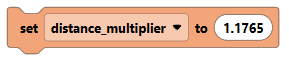
- 60 / 51 = 1.1765
If you told it to go 40" and it actually went 92", then your distance multiplier needs to be smaller:
-
- 40 / 92 = 0.4347
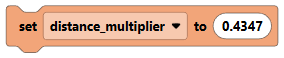
- 40 / 92 = 0.4347
Repeat this test until it drives close to the desired distance each time.
Step 4:
Write a program to move your Clawbot autonomously through the Maze shown below.
Each square is 12 inches.
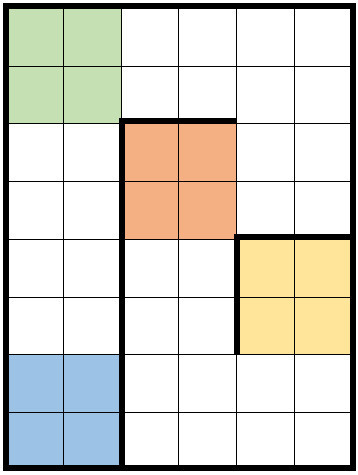
The colors on the map indicate the start and final destination of the robot for each Level. Here is the legend for the map:

Your goal should be to complete Level 2 or higher for this assignment.
Step 5:
When your robot behaves as you wish, borrow a camera and record your robot. Be sure to follow the robot so it is clear that your robot is not touching lines. If this can't be determined by your video, it will be assumed you have crossed a line.
Download the video onto Google Drive into a folder shared with your team members.
NOTE: The video must be shared with team members to be counted for this assignment.
Grading Criteria:
Your personal score will be determined using your personal Teamwork and the groups achievement Level as shown below.
| Teamwork | Level 1 | Level 2 | Level 3 | Grade |
|
|
|
A+ | |
|
|
|
A | |
|
|
|
|
B |
|
|
|
C | |
|
|
D | ||
|
|
F |
*A target is an item of the team's choosing placed by the team at the start of the match.
It must be placed at least 2 tiles (24") from the robot's starting location.