
06: Rover Rescue I
 Learning Target
- Become familiar with the Rover Rescue playground
- Complete robot tasks using code blocks
 Resources
Helpful documentation and tutorials:
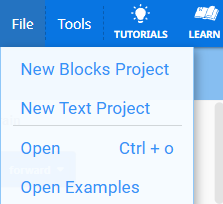
You can find additional examples by choosing "Open Examples" in the VR coding window:
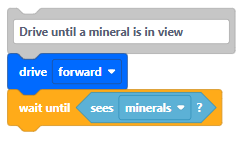
 Code Hints
- Drive until minerals are in view
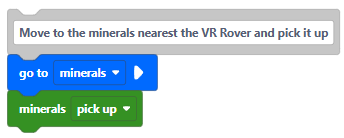
- Go to the minerals location and pick it up
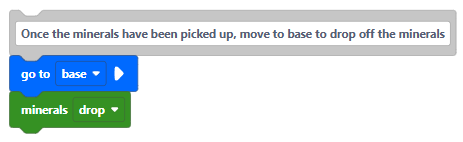
- Go to the base to drop off the minerals
 Instructions
Step 1:
Use this link to access the school's Premium License for VEXcode VR:
https://vr.vex.com/?classcode=TYUDWN
You should see a gold VR icon in the top corner of the screen if you have enabled the extra features:

Step 2:
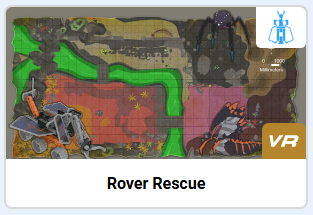
Click the "Select Playground" button.

Choose the Rover Rescue playground.
Step 3:
Collect 3 minerals and drop them off at the base.
Step 4:
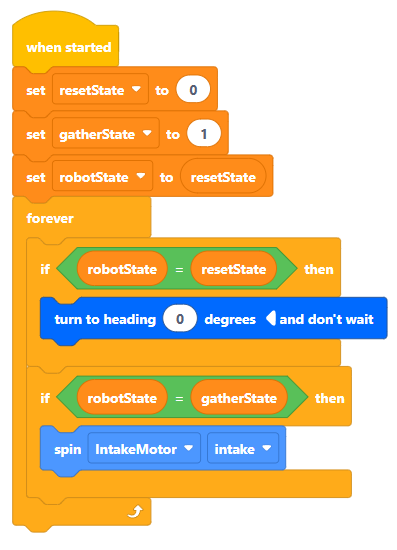
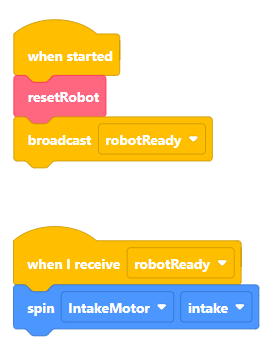
To allow your rover to respond to other events during its travels, you can alter the way your code is structured. There are a couple ways to do this:
| Loop-Based (Ladder Logic) | Event-Based (Messaging) |
 |
 |
Step 5:
Code your robot to do one or more of the following:
-
- Collect additional minerals and drop them at the base
- Neutralize enemies
Step 6:
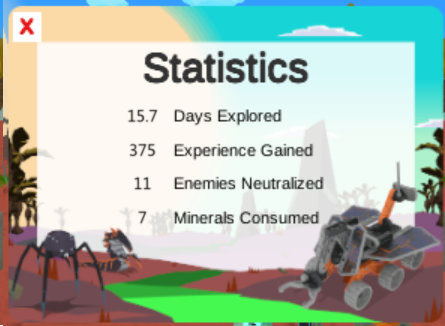
Take a screenshot showing your code and the final statistic window. Click the "View Statistics" button to get this information.
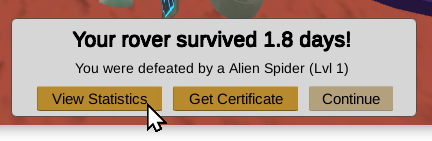
For example:
 Grading
| Your submission... | Your grade... |
|---|---|
|
Extended
|
A+ |
|
Exceptional
|
A |
|
Good
|
B |
|
Reasonable
|
C |
|
Needs Improvement
|
D |
|
Minimal
|
F |
|
Insufficient
|
No Score |
| Scores may be rounded to the nearest whole number. | |