
05: Rude Gold Bug (Part 3)
 Learning Target
- Add connect and configure joints
- Add physics materials to game objects
- Add constraints to rigidbodies and joints
 Resources
- Joints:
- Physics Materials:
 Instructions
Step 1:
You will need to add things to your scene that behaves like a diving board, paddle or flap. You'll use a Hinge Joint for this with "Use Spring" turned on.
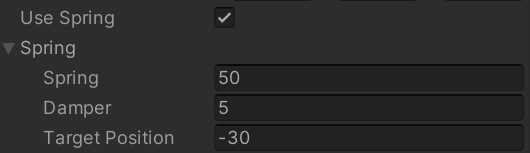
You will also need to add things that rotate under the action of a motor. You also use a Hinge Joint for this with "Use Motor" turned on.
Step 2:
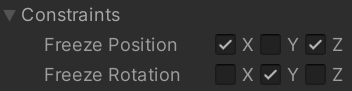
Some things in your scene may need to be locked into place so that they move, but only in certain directions. You can do this with constraints:
Step 3:
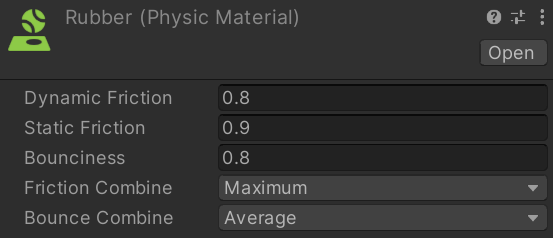
In order for things to move realistically, you'll want to add Physics Materials to their colliders. These materials aren't visible, but determine the bounciness and friction of each surface.
Here is a sample material for rubber:
Step 4:
Once you have all of the parts of your machine in place, it's time to start tuning its movement. You'll want to adjust:
-
- Mass
- Drag
- Friction
- Bounciness
You may also need to add additional constraints to objects until things behave as you wish.
Step 5:
Once things are working as you intend, be sure to double-check the grading criteria and then submit your project!
 Grading
| Your submission... | Your grade... |
|---|---|
|
Exceptional
|
A |
|
Good
|
B |
|
Reasonable
|
C |
|
Needs Improvement
|
D |
|
Insufficient
|
F |
| Scores may be rounded to the nearest whole number. | |